Your personal
time master
in the browser.
A comprehensive productivity tool. Multiple timers, smart alarms, cooking presets, and a stopwatch – all integrated into a convenient Chrome side panel.
Smart alarms
Floating window in panel
4 powerful tools in one place
Replace several different extensions with one elegant solution. Switch seamlessly between modes depending on your needs.
Multi-Timer
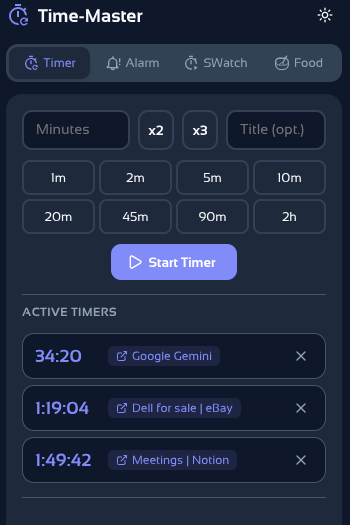
Run multiple timers simultaneously. Each keeps a link to the tab where it was created, making multitasking easier.
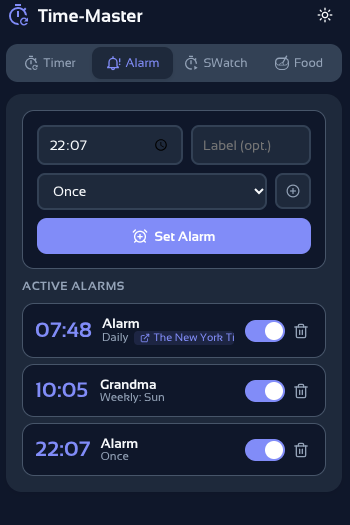
Advanced Alarm
Set one-time, daily, or specific day alarms. Features quick snooze options (2, 5, 10, or 15 minutes).
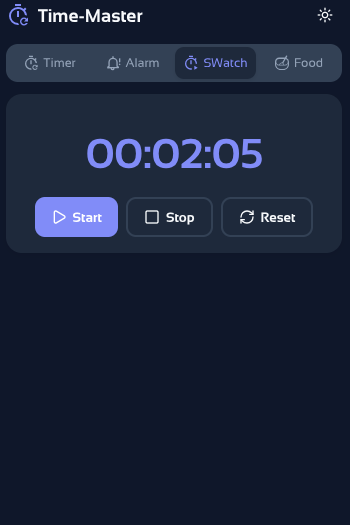
Precise Stopwatch
Simple, elegant, and accurate stopwatch with start, stop, and reset functions. Perfect for tracking work time on a task.
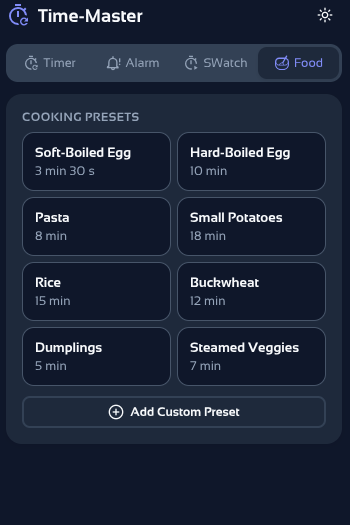
Cooking Presets
Cooking eggs, pasta, or rice? Choose one of 8 built-in presets or add your own favorite cooking times with one click.
Watch this
In less than 60 seconds.
Designed not to disturb
Time-Master works in the innovative Chrome Side Panel. This gives you a constant view of your time without opening new windows or obscuring the page you're reading.
Context management (Tab Links)
When you create a timer or alarm on a specific page, the extension saves its URL. When the countdown ends, you can return to it with one click.
Smart Badge
The extension icon constantly shows the time to the nearest timer or notifies you of a ringing alarm, even when the panel is closed.
Notifications
The app displays an aesthetic notification in the panel, and a pop-up window when the panel is closed.
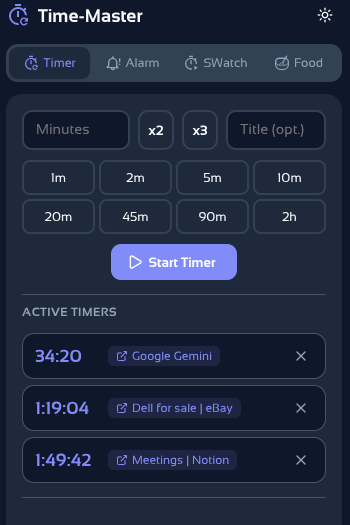
See the interface in action
Clear, modern design automatically adapts to your system mode (Light/Dark).
Frequently asked questions
Everything you need to know about Time-Master.
Ready for better time management?
Install the extension for free and have your alarms and timers always at hand.
Add to Chrome – For FreeNo login required • 100% in-browser • Manifest V3 Security